Hiring scale breaks fast when it relies on fragmented data and disconnected workflows.
When candidate profiles live in silos, interview feedback gets buried in Slack channels, and no one can say with confidence which stage a candidate is actually in, hiring stalls. Good talent slips through the cracks, hiring slows down, and every hiring decision feels less consistent than the last.
An Applicant Tracking System (ATS) is designed to solve this operational friction. It pulls your jobs, candidates, interviews, feedback, and hiring data into one place so the whole team works from the same picture.
This approach is standard practice for high-performing teams; Jobscan data shows that 97.8% of Fortune 500 companies rely on an ATS to anchor their talent acquisition.
This guide covers what an ATS is, how it works, what it can and can't do for you, when it's worth adopting, and the part most articles skip: how to actually choose an ATS platform that your team will use.
Let's dive in.
What is an Applicant Tracking System (ATS) ?
An applicant tracking system is recruiting software that helps you manage the entire hiring process from one place: job openings, candidate pipelines, interviews, feedback, and the data behind it all.
The simplest way to think about it is as the operating system for your hiring. Job requisitions, candidate records, interview scorecards, approvals, team comments, and analytics all live in a single system instead of scattered across tools. Every application is captured, every decision is recorded, and every stage of the funnel becomes something you can see rather than guess at.
How does an ATS work?
An ATS follows the shape of your hiring process, from the moment a role opens to the moment someone accepts an offer.
It usually starts when a recruiter creates a job and publishes it to the company careers page, job boards, and other sourcing channels. As applications arrive, the system collects them automatically and files every candidate into one database.
From there, it parses resumes, pulling out work history, skills, education, and contact details into structured profiles. That makes it far easier to search, filter, and screen a large applicant pool by the criteria that matter for the role.
As candidates move forward, the ATS coordinates the busywork around them: scheduling interviews, requesting and collecting feedback, sending status updates, and maintaining a complete record of every interaction and decision. And because all of this activity is captured as it happens, you end up with the data to measure what's working, spot where candidates stall, and improve the next hire.

Core features of an ATS
A modern ATS typically includes several core features:
- Job posting management: Create openings once and publish them to careers page and multiple job boards.
- Candidate pipeline: Track candidates through clear stages (applied, screened, interview, offer, hired) for each role.
- Resume parsing: Extract information from resumes and candidate profiles automatically.
- Candidate database: Store applications, resumes, notes, communication history, and hiring decisions.
- Interview scheduling: Coordinate interview times with candidates and interviewers.
- Scorecards and feedback: Help interviewers evaluate candidates using consistent criteria.
- Team collaboration: Allow recruiters, HR teams, and hiring managers to work from the same candidate record.
- Automation: Automate reminders, status updates, emails, and repetitive admin tasks.
- Reporting and analytics: Track metrics such as time-to-hire, source quality, conversion rates, and candidate drop-off.
- Integrations: Connect with job boards, calendars, emails, HRIS platforms, and communication tools.
- Compliance support: Help teams maintain records, permissions, and standardized hiring processes.
When does your company need an ATS?
Not every company needs an ATS on day one. But once hiring becomes regular, collaborative, or difficult to track manually, an ATS becomes increasingly important.
You're probably ready for an ATS if several of these sound familiar:
- You have more than 3 open roles at the same time.
- You hire more than 25 to 40 people per year.
- Each role involves multiple interviewers or approval steps.
- Candidate information is scattered across spreadsheets, inboxes, and Slack messages.
- Hiring manager feedback is often delayed or inconsistent.
- Recruiters spend too much time on manual scheduling, reminders, and follow-ups.
- You cannot clearly track source quality, time-to-hire, candidate drop-off, or offer acceptance rates.
- Your candidate experience feels inconsistent from role to role.
- HR leaders need better visibility into hiring performance.
An ATS becomes especially valuable when hiring is no longer a one-person workflow. As soon as recruitment depends on multiple stakeholders, clear process design becomes just as important as candidate sourcing.
What to expect from an ATS
Setting expectations is half the battle. An ATS is a force multiplier, but it serves a specific purpose.
Understanding what it can and cannot do helps you invest for the right reasons and prevents rollout disappointment.
What an ATS does well
- Data centralization: It moves candidate profiles and communications out of individual inboxes into a single source of truth.
- Workflow standardization: It provides every role with a structured, repeatable pipeline, ensuring a consistent hiring process across teams.
- Cross-team coordination: It syncs interview schedules, feedback requests, and offer approvals, reducing communication friction.
- Objective evaluation: It introduces shared scorecards to measure every candidate against identical criteria, mitigating subjective bias.
- Administrative automation: It handles the repetitive work like status updates and reminders.
- Performance visibility: It replaces anecdotal feedback with operational data, tracking metrics like time-to-hire and pipeline health.
What stays in your hands
By clearing repetitive admin work off your plate, a capable ATS frees your team to focus on the strategic elements of hiring. These five critical areas remain yours to own:
-
Sourcing strategy: An ATS organizes candidates but cannot create interest in your roles. Building a talent pipeline, refining your employer brand, and crafting compelling job descriptions are still what fill the top of your funnel.
-
The final selection: Judging cultural alignment and long-term potential is strictly human work. The system surfaces the data and keeps interviewers aligned, but your team makes the call.
-
Data-driven optimization: An ATS makes pipeline performance visible but will not dictate your next move. Reviewing the analytics to shorten a slow interview stage or fix a leaky funnel requires human judgment.
Know your tech stack: ATS vs. CRM vs. HRIS
One of the most common points of confusion is where an ATS fits within the broader HR tech stack. While these systems may overlap in their goals, they serve distinct stages of the talent lifecycle:
- ATS (Applicant Tracking System): Your operational hub for active hiring. It manages candidates from the moment they apply until they sign an offer.
- CRM (Candidate Relationship Management): Your engine for proactive sourcing. It focuses on nurturing potential talent before they apply, building long-term pipelines.
- HRIS (Human Resource Information System): Your system of record for employees. It manages payroll, benefits, performance, and compliance after the candidate is hired.
In short: ATS manages the process, CRM manages relationships, and HRIS manages your people.
| Function | ATS | CRM | HRIS |
|---|---|---|---|
| Pipeline Management | ✅ | ✅ | ❌ |
| Applicant Tracking | ✅ | Partial | ❌ |
| Candidate Nurturing | Partial | ✅ | ❌ |
| Interview Coordination | ✅ | ❌ | ❌ |
| Onboarding | Partial | ❌ | ✅ |
| Employee Records | ❌ | ❌ | ✅ |
| Payroll & Benefits | ❌ | ❌ | ✅ |
| Performance Management | ❌ | ❌ | ✅ |
ATS Categories: Which Type Is Right for Your Team?
Choosing the right ATS comes down to four categories, split by hiring volume and operational complexity. Knowing where your team sits helps you filter out the noise and narrow your options instantly.
Lightweight ATS
Platforms like JazzHR and Teamtailor focus on fast setup and ease of use. They cover essential tasks, including job posting, basic pipeline management, and applicant tracking. These systems offer limited workflow flexibility and standardized reporting, making them ideal for predictable, low-volume hiring.
Best for: Small or early-stage teams transitioning off spreadsheets.
Scalable ATS
Platforms like Moka AI, Recruitee and Ashby balance core functionality with growth potential. They support customizable workflows, hiring-manager collaboration, and HRIS integrations, along with robust reporting. This tier offers structured hiring without the overhead of enterprise-grade implementations.
Best for:Growing SMBs hiring regularly across multiple departments. It fits teams that need a clear balance of structure and agility.
Enterprise ATS
Platforms like Workday Recruiting, Moka AI and SmartRecruiters are designed for global organizations managing complex compliance requirements, layered approval chains, and high-volume demand. These platforms offer extensive configurability and advanced administrative controls. The trade-off is longer implementation timelines, significant investment, and more structured, rigid workflows.
Best for: Large or multinational organizations with mature recruiting operations. It is built for teams with dedicated resources to maintain the system.
AI ATS
A new category of ATS builds artificial intelligence directly into the platform rather than treating it as an add-on. These systems leverage AI for automated sourcing, smart candidate matching, resume screening, conversational scheduling, and deep interview summarization. Because this tier is rapidly evolving, its long-term impact on the hiring ecosystem remains an open and dynamic discussion.
Outlook: The future of AI ATS is not about replacing recruiters, but augmenting them. The winners will be the platforms that combine AI-driven speed with human-led accountability, enabling hiring teams to move faster without sacrificing transparency, compliance, or judgment.
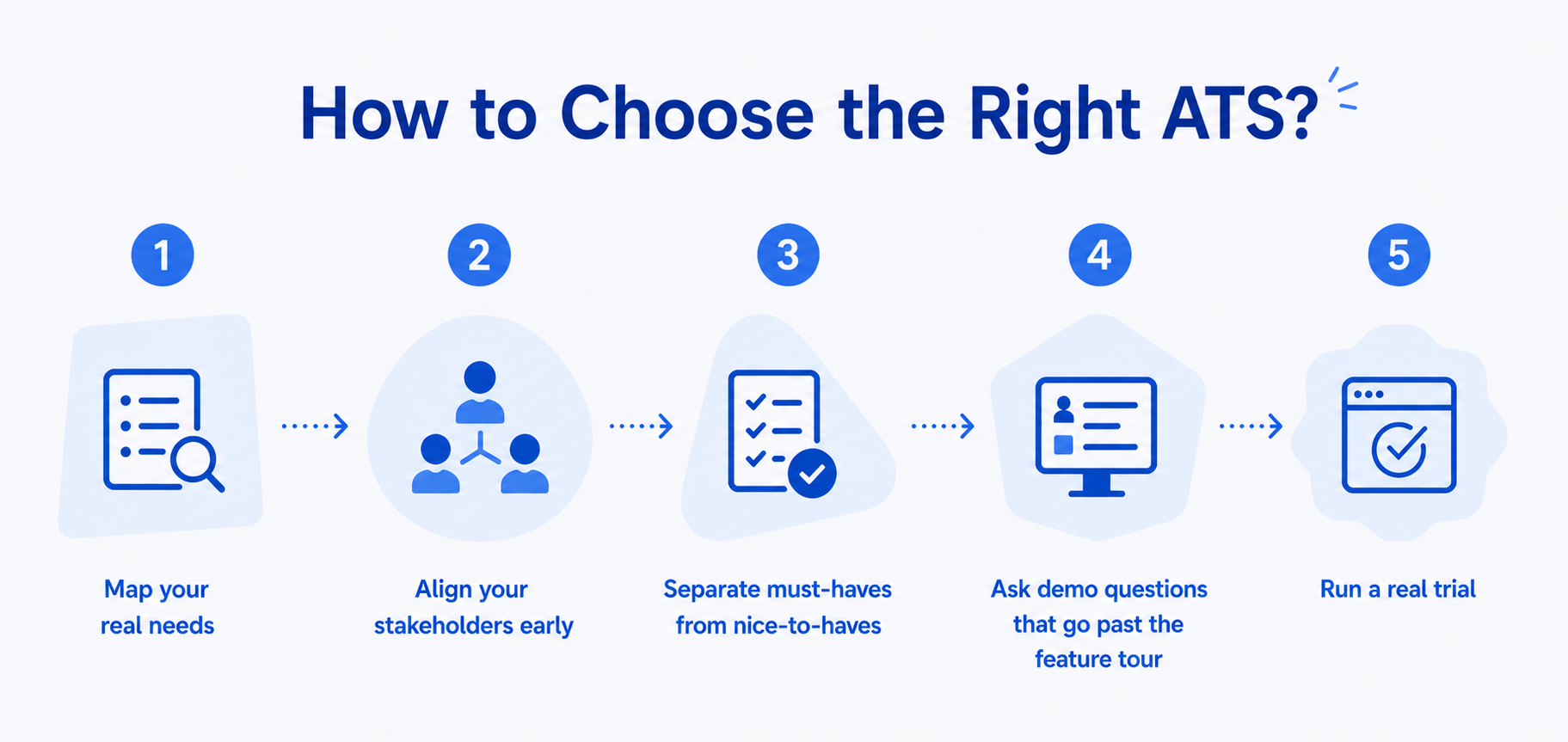
How to choose the right ATS?
The platform with the most capabilities rarely wins on that actually matters: how well it supports the way you really hire. Here's a practical framework to help you evaluate ATS platforms.
1.Map your real needs
Start with how you hire today, not how a vendor thinks you should. Roughly how many roles a year? How many people touch a typical hire? How complex are your approval steps? Where does the current process break down? Document these honestly and they become the evaluation criteria you'll score every platform against.
2.Align your stakeholders early
An ATS extends well beyond the recruiting team. Hiring managers live in it for feedback and reviews; HR owns the process; IT handles integrations and permissions; finance signs off on budget. Gather their input before you shortlist, not after you've signed. The fastest way to undermine adoption is to choose a tool that hiring managers quietly resist.
One of the most common reasons ATS implementations fail is that the system works for recruiters but creates friction for everyone else.
3.Separate must-haves from nice-to-haves
Be honest about the difference. Must-haves are usually structured pipelines, collaboration and feedback tools, the reporting you genuinely rely on, and clean integration with your existing stack. Nice-to-haves are the features that dazzle in a demo such as heavily layered approval flows, niche customization but that many teams never switch on. Don't pay for complexity you won't use.
At the same time, don't overlook candidate experience. Application flows, communication speed, interview scheduling, and mobile accessibility all influence how candidates perceive your employer brand.
4.Ask demo questions
Most ATS demos showcase polished workflows. What matters is how the platform performs in your real-world hiring process and ask vendors to walk through actual scenarios.
Some useful questions include:
- How is feedback collected and tracked?
- How can recruiters identify overdue feedback or bottlenecks?
- What hiring workflows can be automated?
- What reports and dashboards are available out of the box?
- Which hiring metrics can we track without building custom reports?
- How does the platform support collaboration across recruiters and hiring managers?
- How does the system scale if hiring volume doubles next year?
- What does implementation involve, and what ongoing administration is required?
- If we're moving off an existing system, what does data migration look like?
5.Run a real trial
Before making a final decision, move beyond the "happy path" demos and run through these three critical scenarios:
- The Cross-Functional Sync (Collaboration & Adoption)
Simulate a high-stakes search involving several hiring managers. Focus on how the system captures feedback: does it drive structured, scorecard-based reviews, or do you still find yourself chasing managers for input? If your recruiters are still manually following up, it signals that the platform isn't fully easing your administrative load.
- The Edge-Case Handling (Operational Agility)
Real-world hiring is rarely linear. Test how the platform manages friction, such as last-minute rescheduling, panel changes, or emergency workflow adjustments. If these minor updates require vendor support or complex reconfigurations, you risk creating a system that users will eventually bypass.
- Data-to-Decision Speed (Report)
At the end of your trial, assess the platform's diagnostic power. Use the data you have generated to map your pipeline’s health. Specifically, look for where candidates drop off, where hiring managers stall, and why specific roles sit vacant longer than planned.
A capable ATS automates these insights.It turns hours of manual spreadsheet work into a 5-minute dashboard check, allowing you to pivot your strategy instantly.
FAQ
Is an ATS only for large companies?
No. Small and growing companies can also benefit from an ATS once hiring becomes regular, collaborative, or difficult to manage manually.
Can an ATS reject candidates automatically?
Some ATS platforms include automation or AI-assisted screening, but hiring decisions should still involve human review. A responsible ATS supports decision-making; it should not fully replace it.
How much does an ATS cost?
ATS pricing varies based on company size, number of users, features, integrations, and support. Lightweight tools may be more affordable, while enterprise platforms usually involve higher subscription and implementation costs.
What is the best ATS for small teams?
The best ATS for small teams is usually easy to set up, simple for hiring managers to use, and flexible enough to support growth. Small teams should avoid buying more complexity than they can realistically adopt.
What is the difference between ATS and recruiting software?
ATS is a type of recruiting software focused on managing applicants and hiring workflows. Recruiting software can also include sourcing tools, CRM systems, assessments, recruitment marketing, and onboarding tools.
Does an ATS improve candidate experience?
Yes, if implemented well. An ATS can help teams communicate faster, reduce delays, keep candidates informed, and create a more consistent application process.