


Best AI Solutions for Automated Candidate Screening
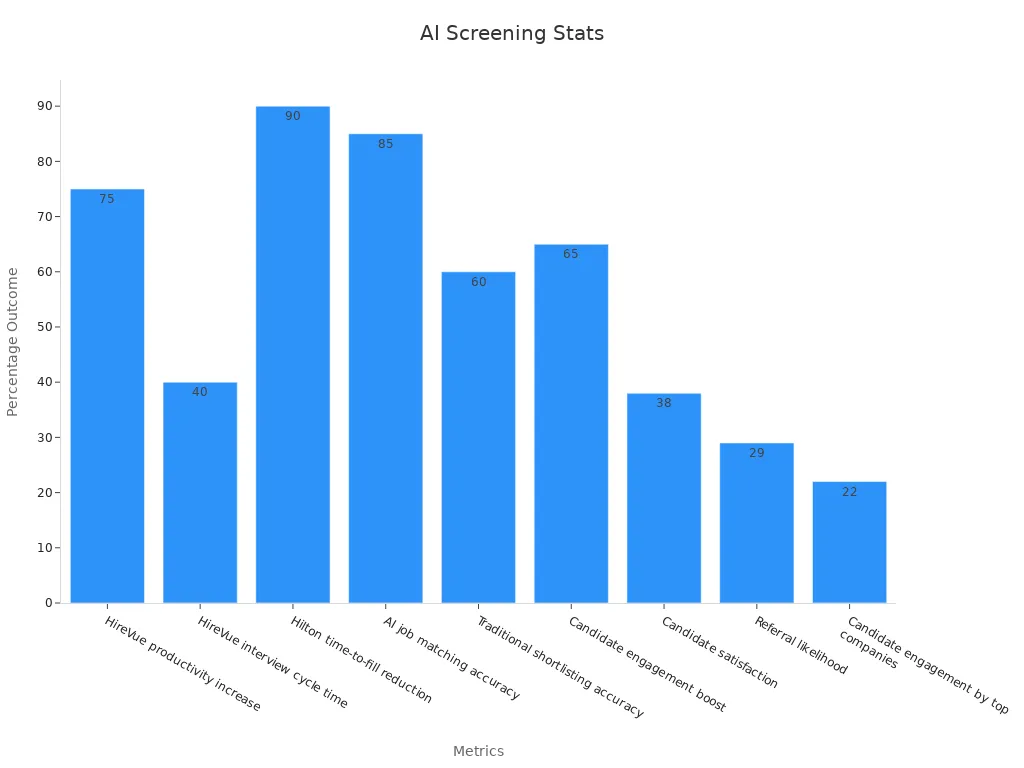
You can make hiring easier with top AI tools like MokaHR, iCIMS, HireVue, Qureos, Avature, Filtered.ai, and Hirebee. These AI tools help you work faster and make fewer mistakes. They also treat everyone fairly and give candidates a better experience. For example, HireVue helps people work 75% faster and cuts interview time by 40%. Hilton filled jobs 90% faster after using AI.
-
AI checks thousands of resumes in seconds. This saves days of work.
-
AI chatbots give updates and help, making candidates happier.
-
Automated screening removes bias. It looks at skills, not age or gender.
-
AI makes sure hiring is fair and based on talent.
| Metric | Outcome |
|---|---|
| HireVue productivity increase | 75% more work done with HireVue |
| HireVue interview cycle time | 40% less time needed for interviews |
| Hilton time-to-fill reduction | 90% faster job filling with AI |
| AI job matching accuracy | 85% of candidates matched in 10 minutes |
| Traditional shortlisting accuracy | 60% matched in one hour |
| Candidate engagement boost | 65% more candidates stay interested |
| Candidate satisfaction | 38% more likely to accept job offers |
| Referral likelihood | 29% more likely to tell friends |
| Candidate engagement by top companies | 22% more candidates talk to AI assistants |
AI Automated Candidate Screening Overview
How AI Screening Works
AI helps you find good workers fast. When you upload resumes, AI tools read them. They look for skills, school, and job history. These tools understand what words mean. This helps match people to jobs better. AI gives each person a score. The score shows how well they fit the job.
AI can check many resumes at once. It does this in seconds. This saves you lots of time. For example, AI can cut screening time in half. It also finds better people for the job. AI can even watch video interviews. It looks at how people talk and act.
Note: AI does not replace people. Recruiters still make the final choice, especially for hard jobs.
Here is what AI does at each step:
| Recruitment Stage | AI Operation | Benefit |
|---|---|---|
| Searching | Looks at profiles and matches people to jobs | Finds better matches faster |
| Screening | Scores people for job fit | Less bias, better choices |
| Interviewing | Checks video and sound for clues | Helps make good decisions |
| Selection | Predicts who fits best | Makes hiring faster and smarter |
Key Benefits
AI screening saves time and money. Companies hire 60% faster with AI. Recruiters save over 200 hours each month. AI also finds better workers. It cuts boring tasks by 70%.
Here are some main benefits:
-
Hire faster with AI resume tools
-
Match people to jobs more accurately
-
Give quick feedback to candidates
-
Treat everyone the same way
| Benefit Category | Measurable Improvement |
|---|---|
| Time-to-hire reduction | 50% less time needed |
| Administrative task reduction | 70% fewer boring tasks |
| Candidate quality improvement | 35% better candidates |
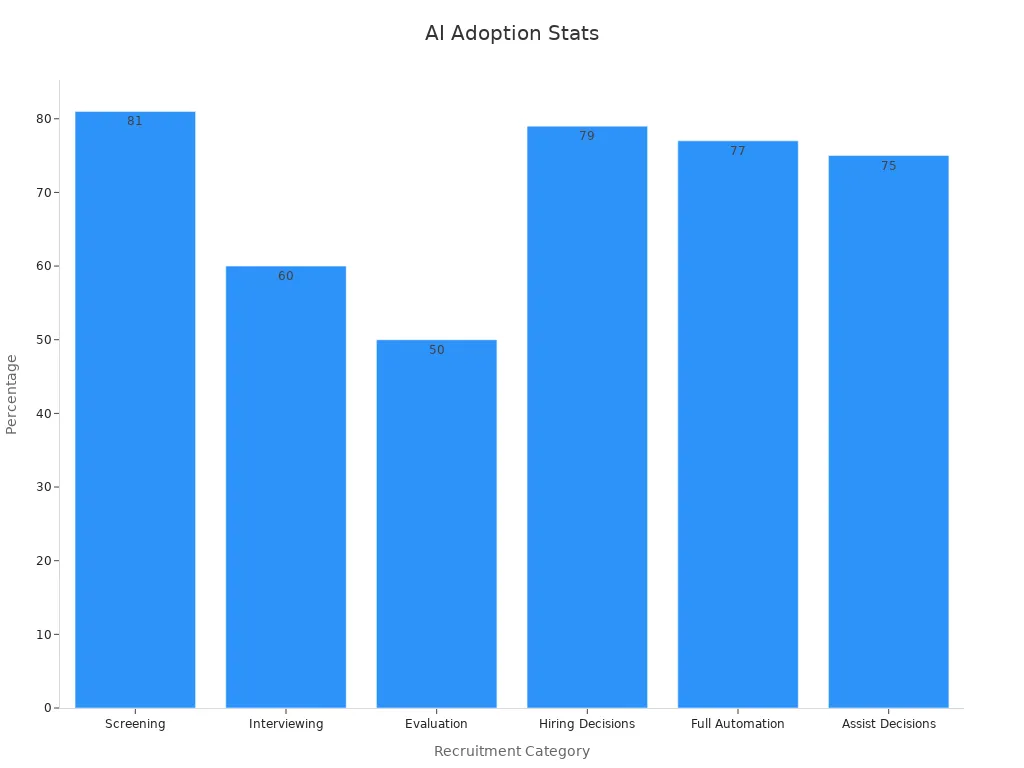
AI hiring is growing fast. In 2023, the market was $590.5 billion. By 2030, it may reach $942.3 million. Now, 81% of companies use AI for hiring. Most HR workers think AI will soon do all hiring steps. AI tools help you stay ahead of others.
You can trust AI to help you hire well. It makes matching and hiring smoother. As more companies use AI, hiring will get even better.
Top AI Recruiting Tools

Image Source: pexels
MokaHR
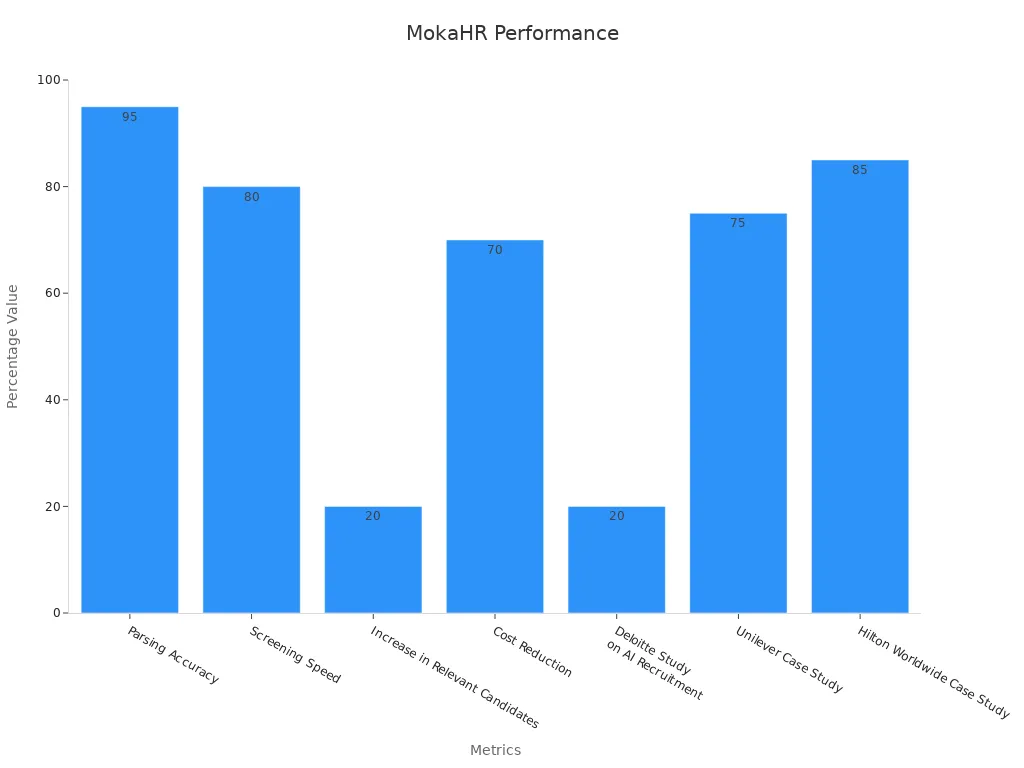
MokaHR is a trusted tool for hiring. It reads resumes and finds details with 95% accuracy. The system uses smart technology to match people to jobs. This helps you find good workers fast. MokaHR makes screening 80% quicker. It also finds 20% more good candidates. You can save up to 70% on hiring costs. It works with other hiring systems to make things easier.
| Metric/Study | Value/Result |
|---|---|
| Parsing Accuracy | 95% accuracy in extracting candidate information |
| Screening Speed | 80% faster candidate screening process |
| Increase in Relevant Candidates | 20% more relevant candidates identified |
| Cost Reduction | Up to 70% reduction in recruitment costs |
| Deloitte Study on AI Recruitment | 20% improvement in quality of hires |
| Unilever Case Study | 75% reduction in time-to-hire |
| Hilton Worldwide Case Study | Over 85% reduction in manual screening time |
MokaHR gets smarter each time you use it. It learns from every hire.
iCIMS
iCIMS is a top tool for hiring with AI. It helps you do every step faster. The system ranks and matches people for you. This means less work for your team. iCIMS gives a 282% return on money spent. It also fills jobs 22% faster than normal. The tool makes hiring smoother and better for everyone. Reports show iCIMS helps companies hire better, move workers inside the company, and treat everyone fairly.
iCIMS lets you hire many people at once. Every person gets a fair chance.
HireVue
HireVue is a popular tool for video interviews. It lets you do interviews online and checks answers with AI. Big companies use it to hire faster and better. Unilever cut hiring time from four months to two weeks. They also hired more diverse people. HireVue users hire 52% faster and save lots of time.
| Metric / Study | Evidence |
|---|---|
| Cost per hire improvement | 2.7x more likely to improve cost per hire using video interviewing |
| Time-to-hire reduction | Up to 33% reduction in time-to-hire |
| Initial screening time reduction | Up to 50% reduction in initial screening time |
| Scheduling time reduction | 58% reduction in scheduling time |
| Recruiter productivity improvement | 67% improvement in recruiter productivity |
| Candidate satisfaction | 82.4% candidate satisfaction with video interviews |
| Candidate recommendation rate | 84% candidates recommend video interviewing |
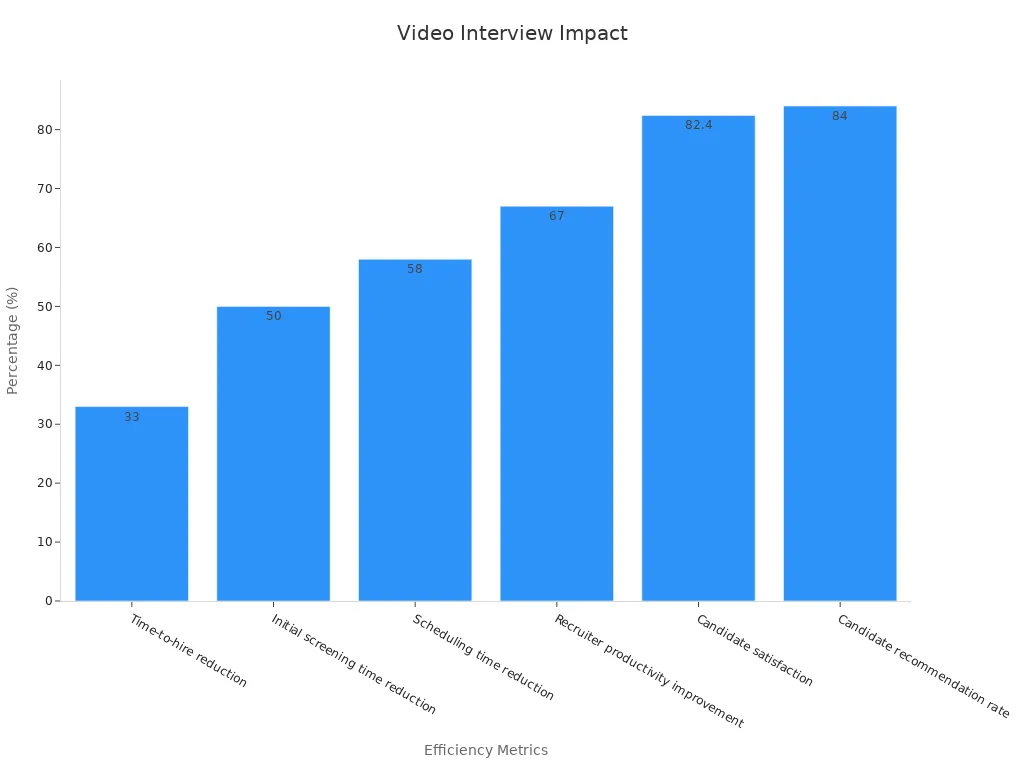
HireVue helps you hire faster, treat people fairly, and makes job seekers happy.
Qureos
Qureos uses AI to focus on skills. Its digital helper guides people as they apply. It answers questions right away. Qureos checks skills, matches jobs, and gives feedback fast. This helps you find the best workers and keeps people interested.
-
Qureos helps you hire many people at once.
-
Its AI makes sure everyone is judged by skills, not just resumes.
Avature
Avature gives you tools for big company hiring. You can change how things work to fit your needs. It sends messages to candidates and ranks them with AI. Avature works with your other HR tools. It helps you match people to jobs and cuts down on manual work.
Avature makes hard hiring tasks easier for both sides.
Filtered.ai
Filtered.ai uses smart scoring to pick the best people. You spend 75% less time reading resumes. More workers stay at their jobs, up by 30%. The tool scores people by skills and experience. This means better matches and less bias.
| Metric | Improvement after AI Shortlisting Adoption |
|---|---|
| Time spent reviewing resumes | Reduced by 75% (from 50 hours to 12 hours per week) |
| Employee retention (hires staying >1 year) | Increased by 30% |
| Recruitment costs | Reduced by 40% |
Filtered.ai helps you find top workers and hire better.
Hirebee
Hirebee is fast and accurate for screening. It cuts screening time by 90%. It also makes hiring 40% more accurate. You can collect answers in many ways. It writes out what people say in over 90 languages. Hirebee works with your HR tools. The system is easy for everyone to use.
| Performance Metric | Improvement / Result |
|---|---|
| Screening time reduction | 90% reduction (e.g., 40 hours to 4) |
| Hiring accuracy improvement | 40% increase |
| Recruitment cost reduction | 30% decrease |
| Time-to-hire acceleration | 50% faster |
| Return on Investment (ROI) | Over 300% within first year |
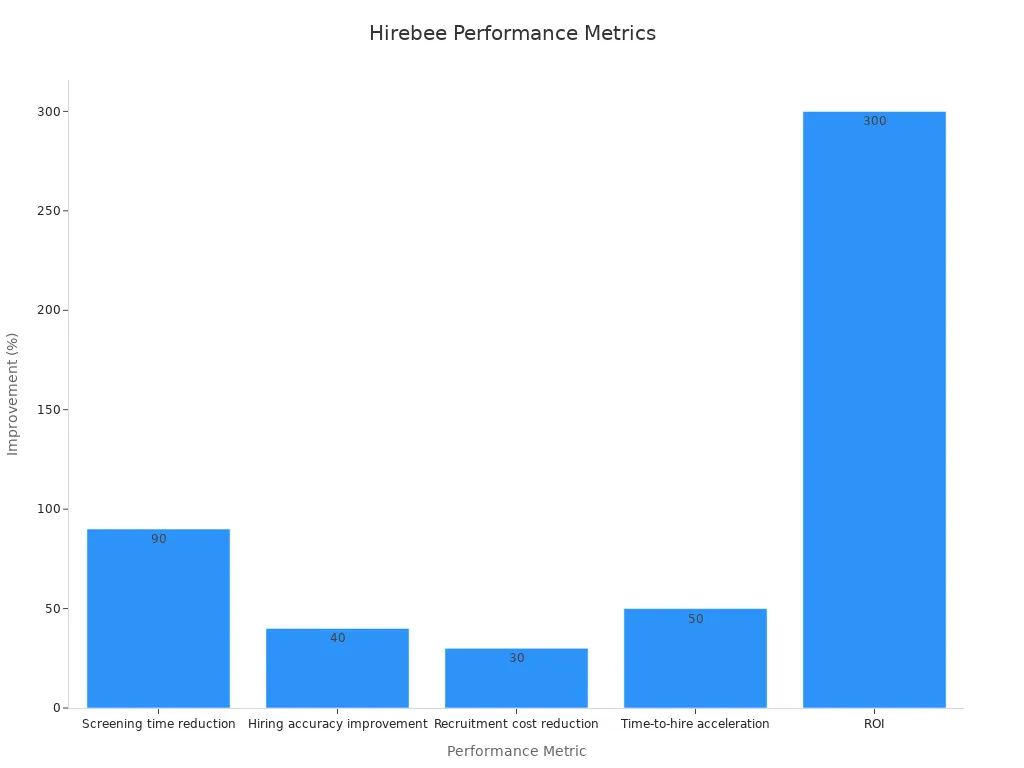
Hirebee helps you save time, spend less, and hire better people.
- These top AI tools help you with resume reading, video interviews, and skill tests. They make hiring easier, treat people well, and help you pick the best workers.
AI Resume Screening Tools

Image Source: unsplash
Features to Look For
Pick AI resume tools that make hiring simple and fair. These tools read thousands of resumes in seconds. This saves you lots of time. Good tools match people to jobs well. They use smart tech to find skills, school, and work history. You can set filters for years worked or degrees. This helps you see the best people first.
A strong tool looks for words that fit your job. It finds and removes repeat resumes. This keeps your list clean. Bias tools hide names and photos. This helps you judge by skills only. Make sure the tool reads all file types. Bulk upload lets you add many resumes at once.
| Performance Indicator / Feature | Description |
|---|---|
| AI-Powered Parsing | Finds skills, jobs, and school for better matches. |
| Customizable Filters | Lets you pick what matters most in a worker. |
| Keyword Matching | Spots resumes with the right skills for your job. |
| Duplicate Detection | Removes extra copies of the same resume. |
| Bias Reduction Tools | Hides personal info to help fairness. |
| Bulk Resume Upload | Checks many resumes fast for big hiring needs. |
Check if the tool picks good workers and helps diversity. Do regular checks to keep things fair and right.
Integration with HR Systems
AI resume tools work best with your HR system. This lets you move data easily from screening to hiring. It saves time and stops mistakes. Big companies like Unilever and Hilton saved 75% of their time this way. You can also set up interviews and get smart reports.
When you link AI tools to your hiring system, you match people faster. You also keep data safe and follow the rules. Companies like PepsiCo and L'Oréal use these links to hire better. You can use reports to plan and improve hiring.
Tip: Make sure your AI tools keep data safe and follow the law.
AI Tools for Recruiters
Enhancing Efficiency
AI tools help recruiters work faster and smarter. These tools do boring jobs like reading resumes and setting up interviews. They also send messages to candidates. This saves time and makes work easier. With AI, you can focus on big choices, not small tasks.
-
AI software does up to 75% of the hiring work. It reads resumes and sets up meetings.
-
AI tools look at lots of data fast. They find patterns and show where to find good workers.
-
Automation lets you spend more time talking to people and picking the best ones.
-
More than half of companies now use AI tools. They want better results and faster hiring.
Studies show AI tools cut hiring time in half. They also make hiring 40% better. Intel found better workers with AI. Unilever hired 16% more diverse people after using AI. See the table below for more details:
| Metric | Outcome / Improvement |
|---|---|
| Time-to-fill reduction | 50% less time needed with AI |
| Hiring time reduction | 75% less time at Unilever with AI |
| Hiring efficiency | Up to 40% better with AI, says McKinsey |
| Candidate quality | 25% better with skilled recruiters and AI |
| Diversity increase | 16% more diverse hires at Unilever |
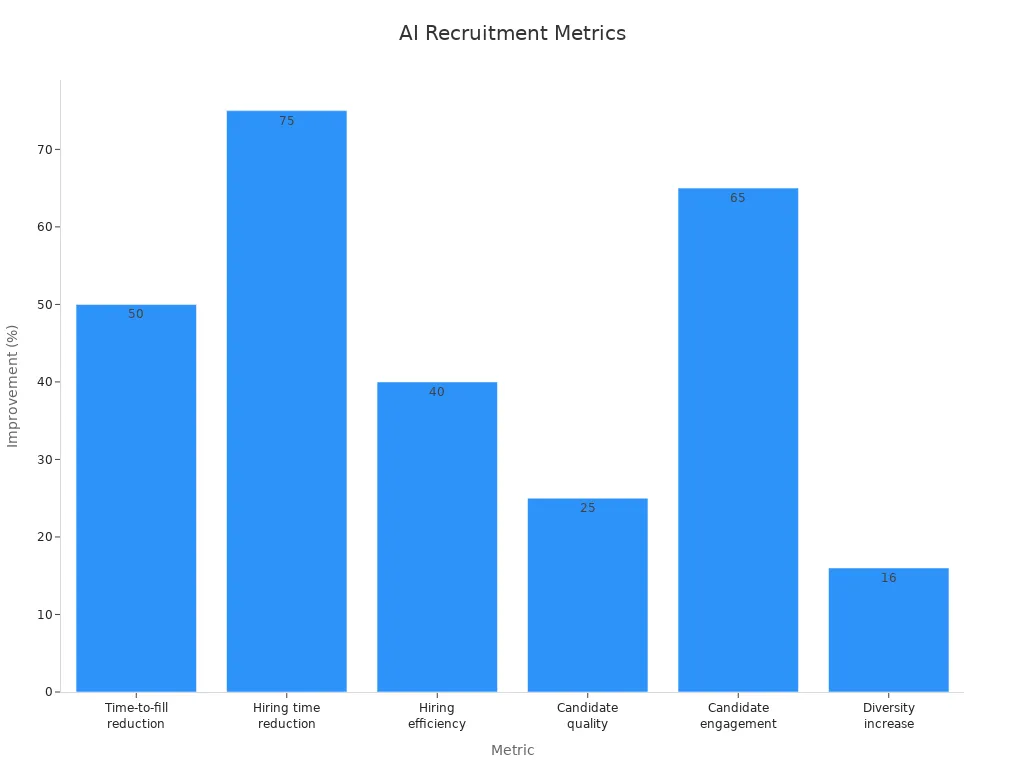
AI tools also help you find people and post jobs online. They match people to jobs quickly. This helps you hire faster and reach more people.
Improving Candidate Experience
AI tools help make things better for job seekers. They send messages that feel personal. They give feedback fast and treat everyone fairly. Candidates feel important and know what is happening.
-
76% would say no to a job after a bad interview.
-
Companies that care about candidates hire 70% better people.
-
AI uses fair questions and less bias to match people to jobs.
You can use surveys after interviews to see how people feel. AI tools send out these surveys and find trends fast. With AI, hiring is 40% quicker and 65% more people stay interested. This means more people say yes to job offers and tell friends.
AI tools make every part of hiring easier for you and job seekers.
Choosing an AI Candidate Screening Solution
Assessing Needs
First, write down how you hire people now. Think about what you want to make better. Make a list of what you need in a tool. Check how many people you hire and your budget. Think about if your team will grow or move to new places. Try out tools with free trials. Ask your team and job seekers what they think. See if the tool is easy to use and fits your needs.
| Assessment Category | Key Data Points and Framework Elements |
|---|---|
| Current Needs | How many hires, money to spend, must-have features, team skills, works with other tools |
| Future Growth Planning | Can it grow, add new features, help with new offices, future spending |
| Testing and Validation | Free trials, test runs, feedback from team and job seekers, good help from company |
| Technical Requirements | Works on your devices, connects to hiring system, safe, works on phones |
| Core Functionalities | Good video and sound, can change settings, easy for job seekers, supports many languages |
| User Experience | Easy to start, simple to use, training, help when needed |
| Budget Considerations | Start-up costs, monthly fees, how you pay, will it save money |
| Implementation Needs | Set up, IT help, training, moving old data |
| Scalability and Future-proofing | Can add more users, price for bigger teams, company is stable, help grows with you |
| Ethical and Risk Factors | Keeps data safe, follows rules, company is stable, no unfair bias, clear service rules |
Tip: Make sure your team agrees on what matters most. Set clear goals for hiring.
Data Privacy & Compliance
You must keep people’s data safe and follow the law. Rules say you must keep records and check where data comes from. Write down how your tools make choices. Pick tools with strong privacy rules. Make sure they explain how they work. Check if they follow laws like GDPR and EEOC. Do regular checks to stay safe. Let people know how you use their data and get their okay.
-
Tell people how you use AI to hire.
-
Let people control their own data.
Scalability & Support
Pick tools that can grow with your company. Make sure they can handle more users and data. Good tools use AI to find and fix problems fast. Choose companies that give good help and training. This keeps hiring smooth and stops problems. As your company changes, your tools should keep working well.
A tool that grows with you helps your hiring stay strong.
Challenges in AI Candidate Screening
Addressing Bias
Automated hiring tools can have problems. One big problem is bias. Sometimes, these tools make unfair choices. This happens if the training data is not fair. For example, if old data likes some schools, the tool may do the same. This means some people get left out.
You can fight bias with fairness checks. Use tools like IBM AI Fairness 360 and Google’s What-If Tool. These tools help you find unfair patterns and fix them. The table below shows ways to stop bias at each step:
| Stage of AI Development | Role of Statistical Analyses and Bias Audits | Actions to Address Bias |
|---|---|---|
| Framing the Problem | Check for harm to groups; include many voices | Involve many experts early |
| Data Sources | Look for missing groups in data | Use data from many places |
| Data Preprocessing | Find and fix data errors | Use bias reduction methods |
| Model Development | Use clear steps; avoid hidden bias | Explain how the tool works |
| Model Validation | Test results for all groups | Change settings if needed |
| Model Implementation | Watch for new problems | Update the tool often |
People and computers should work together. Studies show this helps avoid mistakes. Regular checks and clear rules help job seekers trust the process.
Data Security Concerns
You must keep personal data safe when using these tools. They collect lots of private info, like resumes and test answers. If you do not protect this data, it could leak or be misused.
Some tools have leaked private info because of weak controls. Problems include too much data, bad access rules, and hackers. You should use strong privacy rules and only collect what you need. Laws like GDPR and CCPA say you must get permission and explain how you use data.
To keep data safe, do these things:
-
Only collect what you really need.
-
Hide names and use codes to protect records.
-
Let only the right people see private data.
-
Check your systems often and update your plans.
-
Watch for tools your IT team does not control.
You should also have a risk plan. This helps you find new problems and fix them fast. By doing these things, you keep job seekers’ trust and avoid legal trouble.
You can make hiring better by picking the right tools. Think about what you need and compare options carefully. Look at things like how accurate they are, how much money they save, and if users like them. Check reports often to see if the tool works well, helps your business, and follows rules.
| KPI Type | Important Measures to Check |
|---|---|
| Tool Accuracy | How correct and reliable the results are |
| Business Benefits | Money saved, time saved, and return on investment |
| User Happiness | How satisfied users are and how often they succeed |
| Rules and Safety | Following laws and keeping data private |
Tip: Try a demo or test the tool first to find the best fit for your team.
FAQ
What is AI candidate screening?
AI screening uses smart computer programs. These programs read resumes and job forms. They look for skills, school, and work history. You get results faster. The system helps you find good workers quickly.
How do AI tools reduce hiring bias?
AI hides names and photos from resumes. You only see skills and work experience. This helps you judge people fairly.
Tip: Check your tool often to make sure it is fair.
Can AI screening tools work with my current HR software?
Yes, most AI tools work with big HR systems. You can move data easily and keep things running well.
| HR System | Works With AI Tools |
|---|---|
| Workday | ✔️ |
| SAP SuccessFactors | ✔️ |
| BambooHR | ✔️ |
Are AI screening tools safe for candidate data?
You keep data safe with strong security steps. Good tools use codes to lock data and follow privacy laws.
-
Pick tools that follow GDPR or CCPA rules.
-
Only let the right people see private info.
See Also
Unlocking Candidate Potential With Advanced AI Hiring Tools
AI-Powered Hiring Software Delivering Smart Interview Experiences
Using ATS Technology To Spot The Best Job Applicants
Applicant Tracking Systems Simplify Finding Qualified Candidates
Elevate Hiring Efficiency With MokaHR’s AI Recruitment Platform

Author
Moka AI Editorial Team
The Moka AI Editorial Team creates insightful, practical, and engaging content on HR, recruitment, and AI innovation. We explore emerging trends, share industry insights, and turn complex ideas into actionable knowledge to help HR professionals navigate the evolving world of work.