Top 5 Lever AI Alternatives for Smarter Hiring in 2025


Are you searching for a lever ai alternative to improve hiring? You can pick from Moka HR, Pinpoint, Greenhouse, Kula, or BreezyHR. HR experts say new recruitment tools are very important now. The best tool helps you make hiring easier and keeps your team ready in a fast-changing market.
Moka HR
Pinpoint
Greenhouse
Kula
BreezyHR
Key Takeaways
Check out other Lever AI options like Moka HR, Pinpoint, Greenhouse, Kula, and BreezyHR. These tools can help you hire the right people. Try demos or free trials to see which one works best for your team. Make sure the platform fits your team's needs and how you work. Think about your hiring problems and pick a tool with the features you need. Look for things like automation, customization, and integration.
Best Lever AI Alternatives 2025
Quick Comparison Table
This table shows the top lever alternatives for 2025. You can use it to see what each one does best. It helps you pick the right tool for your team.
Platform | Standout Features | Best For | Customer Feedback |
|---|---|---|---|
Moka HR | AI-powered automation, global support, fast resume review | Fast-growing teams, global hiring | “Cuts time-to-hire by 40%.” |
Pinpoint | Custom workflows, employer branding, analytics | Mid-sized companies, branding | “Easy to use and flexible.” |
Greenhouse | Structured hiring, integrations, reporting | Large enterprises, scaling | “Great for process improvement.” |
Kula | Automated sourcing, outreach, pipeline management | Tech startups, sourcing focus | “Helps build strong pipelines.” |
BreezyHR | Drag-and-drop pipelines, video interviews | Small businesses, remote teams | “Simple and quick to set up.” |
Key Differences Overview
You need a lever ai alternative that fits your way of hiring. Moka HR is good if you want smart tools and help for hiring around the world. Pinpoint is great for showing off your company and making your own hiring steps. This helps you get the best people. Greenhouse is best for big groups who want a strong tracking system and lots of ways to connect other tools. Kula is made for finding new people fast, so you can grow your team quickly. BreezyHR is easy to use and lets you set up video interviews, which is nice for small teams.
A lot of lever alternatives now use AI to make hiring faster. Some, like Moka HR, let you do less boring work and spend more time with people. Others, like Greenhouse and Pinpoint, give you lots of reports and data. If you want to try even more tools, Juicebox and SeekOut are also good. They use AI to help you find and learn about candidates. Now, you have many choices to help your team hire the right people.
Tip: Try a demo or free trial before you choose. This helps you see which tool works best for your team.
Why Consider a Lever Alternative
Common Pain Points
You might feel frustrated with your current hiring software. Many HR teams run into the same problems. Here are some common pain points you could face:
Slow or clunky user interface makes your day harder.
Limited automation means you spend too much time on manual tasks.
Poor integration with your favorite recruitment tools can slow down your workflow.
Lack of support for global hiring leaves you stuck when you want to grow.
Reporting features may not give you the insights you need for talent acquisition.
If you notice these issues, you are not alone. Many companies look for lever alternatives because they want a smoother, smarter hiring process.
When to Switch
You should think about switching when your current system holds you back. Maybe your team is growing fast, or you want to hire in new countries. If you find that your software cannot keep up, it is time to explore a lever ai alternative. You might also want to switch if you need better automation or more flexible features. New recruitment tools can help you save time and find better candidates. When you want to stay ahead in talent acquisition, the right platform makes all the difference.
Moka HR Overview
Features & Benefits
You want a tool that helps you hire faster. Moka HR can do this for you. Here are some things you get with Moka HR:
Feature/Benefit | Description |
|---|---|
Automation Software | Makes planning, managing, and hiring easier. |
Employee Engagement | Gives boards and rewards to help workers feel good. |
Cloud-Based Access | Lets you see data anywhere, anytime, with less work. |
Improved HR Metrics | Helps you use data to make smart choices and finish tasks. |
Cost Reduction | Saves money by using automation and letting you do things yourself. |
More than 2,000 brands use Moka HR. These brands include small startups and big companies. Moka HR helps them hire people quickly and easily. The platform uses ai-driven candidate sourcing to find the best people fast.
Pros & Cons
Here are some good things about Moka HR:
Special features for Asian companies
Works in many countries and languages
Easy design for managing candidates
Strong tools for reports and analytics
Customer support all day and night
Some people say Moka HR is still growing in some places. It keeps adding new features.
Pricing
Moka HR has prices that fit your company’s needs. You can ask for a price made just for you. Many people think the price is fair because it saves time and helps you hire better.
Ideal Use Cases
Moka HR is great for tech startups that want to work better. Healthcare groups use it to track rules. Medium-sized companies in any field use it to make HR jobs faster and easier.
Pinpoint Review
Features & Benefits
You want a hiring tool that is easy to use. Pinpoint has a simple interface. You can start using it right away. It helps you find good candidates fast. The platform lets you track people as they move through hiring. You can connect Pinpoint to other HR systems and job boards. This makes your work easier. You can change workflows and use automation to fit your team. Pinpoint works on phones, but it works better on computers.
Pros & Cons
Here is what users like and do not like about Pinpoint:
Advantages | Disadvantages |
|---|---|
The interface is easy for new users to learn. | You cannot change some things to fit your company. |
It helps you find and talk to good candidates. | Setting up Pinpoint can take a lot of time and skill. |
It tracks applicants and makes hiring smoother. | It can get slow when many people use it at once. |
You can connect it to other HR systems and job boards. | It does not work with all third-party apps. |
You can change workflows and use automation. | The reports are basic and cannot be changed much. |
The mobile app has fewer features than the computer version. |
Pricing
You have to ask for a demo to see the price for Pinpoint. This means you cannot test it right away. Other tools, like Workable, show prices. Workable starts at $149 each month. Greenhouse and Lever also give prices after you ask, just like Pinpoint.
Ideal Use Cases
Pinpoint is best for teams who want to hire faster. It helps if you have a mid-sized company or use referrals. For example:
Pasta Evangelists got 40% of new hires from referrals and saved money.
Tata Chemicals hired faster and had more diversity by hiding names.
If you want a system that is easy to use and helps you hire quickly, Pinpoint is a good choice.
Greenhouse Insights
Features & Benefits
You want a hiring tool that helps you work smarter. Greenhouse uses AI to make your hiring process faster and more effective. You get access to these AI tools no matter which plan you choose. This means you can save time and make better choices when picking new team members.
AI boosts your hiring speed and accuracy.
Every plan includes AI features, so you do not miss out.
You can make decisions with more confidence.
Greenhouse helps you set up a clear and fair hiring process.
Big names like HubSpot and Duolingo trust Greenhouse for their teams.
Most users feel happy with Greenhouse. In fact, 98% say they are satisfied, and 94% give it top marks. Almost 9 out of 10 users would tell a friend to try it.
Pros & Cons
Here is a quick look at what people like and do not like about Greenhouse:
Pros | Cons |
|---|---|
User-friendly interface | High cost |
Customizable workflows | No phone support |
Strong integration options | Setup can be complex |
Automation for scheduling | Some features may not be needed |
Helpful reports and insights | Limited HRIS features |
Great for data-driven decisions | Best features on higher plans |
Good for high-volume hiring | Not ideal for small teams |
Tip: If you want a tool that grows with your company, Greenhouse can be a strong choice.
Pricing
Greenhouse uses a custom pricing model. You pick from three plans: Essential, Advanced, or Expert. Prices start around $6,000 per year for small teams. Large companies may pay up to $70,000 each year. If you want extra features, you may pay more. You can ask for a free demo to see what fits your needs.
Ideal Use Cases
Greenhouse works best for companies that need strong candidate management. If you hire a lot of people or want a clear process, this tool fits well. Many big brands use Greenhouse to keep hiring fair and organized. You might like it if you want to track every step and use data to make choices.
Kula Highlights
Features & Benefits
Kula gives you tools to help with hiring. You can see all your hiring data in one place. This keeps things neat and safe. You can make your own dashboards to see the numbers you care about. Kula lets you use smart analytics to guess what your team will need. This helps you plan and hire the right people faster.
Here’s a quick look at what Kula offers:
Feature/Benefit | Description |
|---|---|
Recruitment Data Management | Keeps your data safe and follows rules like GDPR. |
Customizable Dashboards | Lets you pick what info you want to see. |
Advanced Predictive Analytics | Helps you plan for future hiring needs. |
Comprehensive Reporting | Tracks every step and keeps you in control. |
Shared Analytics Dashboards | Makes it easy to work with your team. |
Automated Data Collection | Saves time by cutting out manual work. |
Centralized Data Repository | Stores all your info in one spot. |
Real-time Data and Insights | Gives you quick answers for better choices. |
API Capabilities | Connects with other tools you use. |
Tailored Onboarding Programs | Helps your team learn how to use Kula fast. |
Pros & Cons
You want to know what is good and what is hard with Kula. Here is a table to help you think about it:
Pros | Cons |
|---|---|
User-Friendly Interface | Pricing Transparency |
Extensive Integrations | Learning Curve |
Comprehensive AI Integration | Integration Setup Issues |
Tip: Kula is easy to use and connects with many apps. It may take time to learn all the features.
Pricing
Kula lets you pay for only what you need. If you just want the basics, you pay less. If you add more, the price goes up. Here is a list:
Feature Module | Monthly Cost |
|---|---|
Core ATS Module | $99 |
Advanced Reporting Module | +$50 |
Video Interviewing Module | +$75 |
AI Candidate Matching Module | +$100 |
Onboarding Module | +$80 |
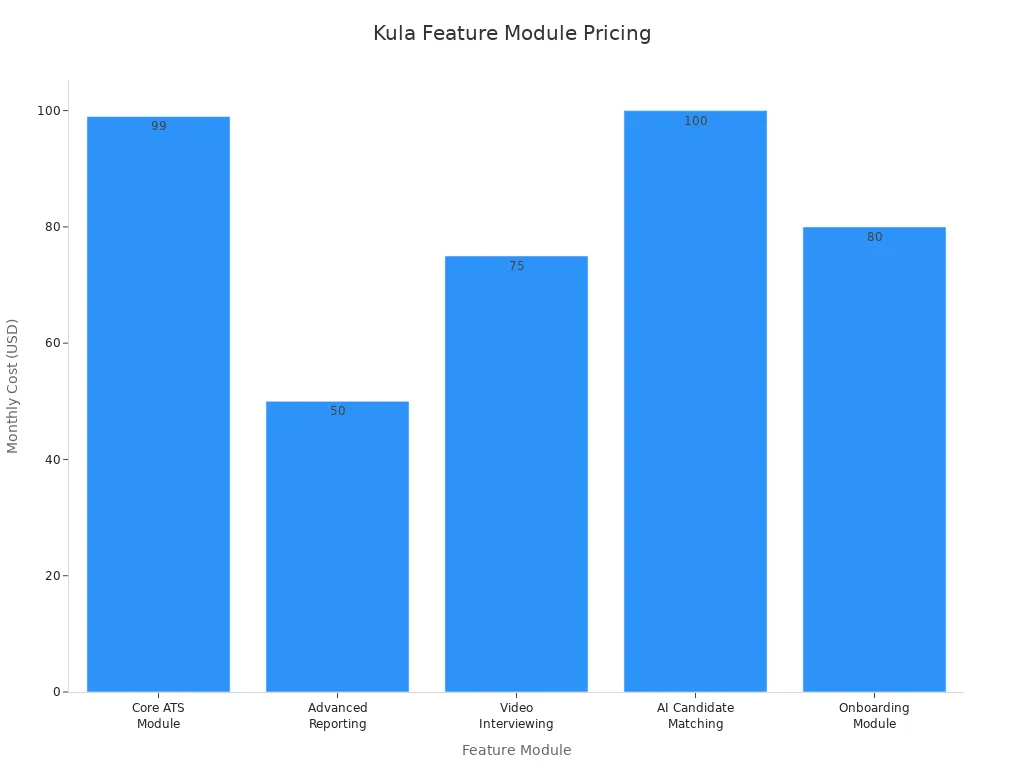
Note: Kula can be a good deal if you need only a few things. If you want every feature, the price can get high.
Ideal Use Cases
Kula is best for groups that care about community and wellness. If you run a club, a wellness group, or a fitness business, Kula can help. You can use it to manage hiring and keep things simple.
BreezyHR Summary
Features & Benefits
You want a hiring tool that is simple to use. BreezyHR has an easy interface, so you can start fast. You can change workflows to match how you hire. BreezyHR links to many job boards, so you find more people quickly. You can set up automation to save time on tasks. If you need help, BreezyHR has strong customer support.
Here are some features you may like:
Branded career site helps show your company
Job board sharing lets you reach more people
Automated reference checks save time
Employee referrals help you find trusted people
Job and offer approvals keep things moving
BreezyHR gets 4.4 out of 5 stars on G2. Users say it is quick to set up and support is fast.
Pros & Cons
You want to know what is good and what is not. Here is a table to help you choose:
Pros | Cons |
|---|---|
Better client communication | Resume screening is slow |
Easy to use and not expensive | Support and UX can be poor |
Simple interface | Setup instructions are unclear |
Strong ATS for managing candidates | Not much customization |
Integrates with other tools | Sometimes glitches or downtime |
Great customer support | Weak reports and analytics |
High price for small teams | |
Mobile app misses info |
Pricing
BreezyHR costs $157 each month. This price is good for small teams and startups. Workable costs $189 each month. BreezyHR is a good deal if you want simple hiring tools and a lower price.
Platform | Starting Price | Target Audience |
|---|---|---|
BreezyHR | $157 | Small teams, startups |
Workable | $189 | Bigger companies |
iSmartRecruit | Cheaper | All team sizes |
Ideal Use Cases
BreezyHR works for many teams. Booster Box used it to find people who fit their values. DP Logistics hired faster by using automation. Docebo grew quickly with better recruiting. Dodge Data & Analytics hired much faster. Dollar Flight Club saved time sorting lots of applicants. BreezyHR also helps churches, tech groups, and remote teams hire well.
Tip: If you want a tool that grows with your team and makes hiring easy, BreezyHR is a good choice.
Lever AI Alternative Comparison

Feature Comparison
You want to see what makes each system special. Here is a quick look at the top lever alternatives:
Moka HR uses AI to help with hiring. It reviews resumes fast and helps teams in many countries.
Pinpoint lets you make your own steps for hiring. It helps show off your company and gives you reports.
Greenhouse helps you find new people and has strong tools for tracking. It works well for big teams.
Kula gives you smart interview tools, scores candidates, and sets up meetings for you.
BreezyHR makes it easy to post jobs, sort candidates, and build a career page.
Each platform has something different to help you hire better. You can choose the one that fits your team best.
Pricing Overview
You want to know how much each tool costs. Here is a table to help you compare:
Platform | Starting Price (per month) | Pricing Model |
|---|---|---|
Moka HR | Custom quote | Scales with needs |
Pinpoint | Custom quote | Scales with company |
Greenhouse | ~$500+ | Custom plans |
Kula | $99 (Core ATS) | Add-on modules |
BreezyHR | $157 | Tiered plans |
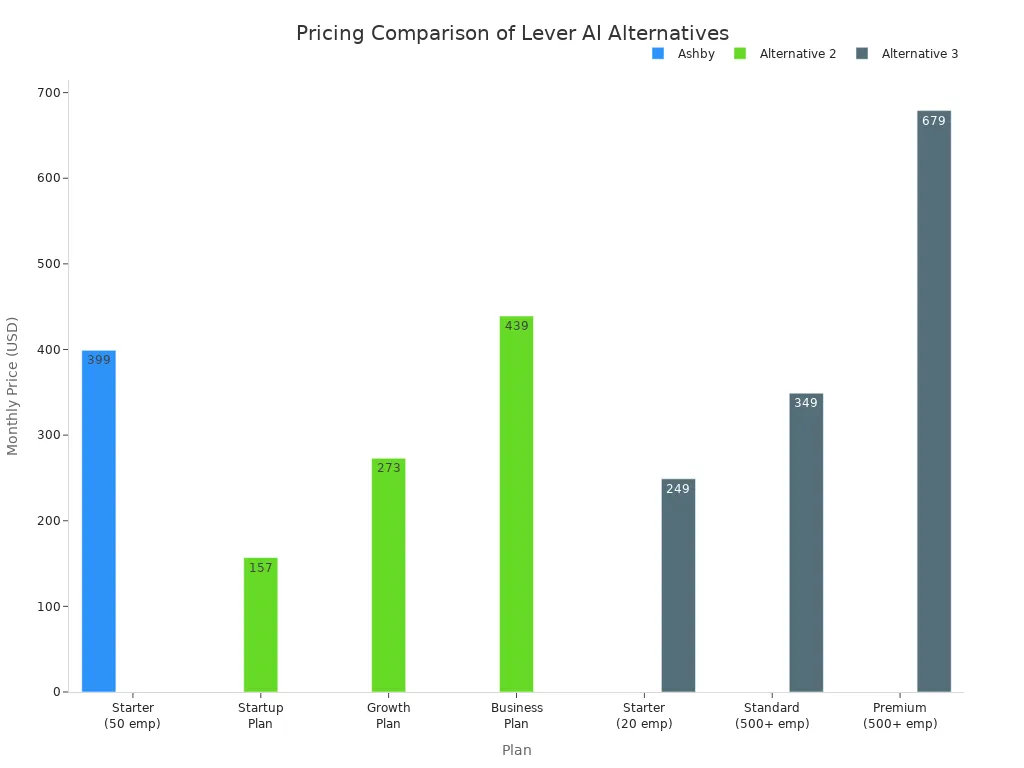
Prices can change if you want more features or have a bigger team. Some tools let you pick only what you need.
Best Fit Scenarios
You want to find the best tool for your team. Here are some tips to help you choose:
Pick Moka HR if you hire in many countries and want smart tools.
Choose Pinpoint if you want to make your own hiring steps and show off your brand.
Use Greenhouse if you have a big team and need lots of reports.
Try Kula if you want smart tools for finding people and checking data.
Go with BreezyHR if your team is small and you want something easy to use.
Tip: Think about how big your team is and what you need most before you choose a tool.
Choosing the Right Lever Alternative
Assessing Your Needs
Before you pick a new hiring platform, take a close look at what your team really needs. Start by asking yourself a few questions. How many people do you plan to hire this year? Do you need to manage hiring in different countries? Maybe you want to save time by using more automation. Some teams need detailed reports, while others just want something easy to use.
Tip: Write down your top three hiring problems. This will help you focus on what matters most.
Think about your company size. Small businesses often want simple and affordable tools. Medium-sized companies look for a balance between features and price. Large companies need advanced options and the ability to grow. You should also check if your current systems connect with new recruitment tools. This can save you a lot of time.
Decision Factors
When you compare each lever ai alternative, look for features that match your needs. HR experts say you should pay attention to these things:
Customization and flexibility: Can you change workflows, templates, and reports to fit your process?
Integration: Does the software connect with your HR, payroll, and calendar tools?
Scalability: Will the platform grow with your business?
Advanced analytics: Do you get detailed reports and data to help you hire smarter?
Automation: Does it help you cut down on manual work?
If your hiring process is complex, you may want a platform with strong automation and custom options. For simple needs, choose a tool that is easy to set up and use. The right choice will help you build a better team and make hiring less stressful.
You want to hire smarter and stay ready for the future. Try out a few platforms and see which one fits your team best. AI tools, skills-based matching, and personalized experiences help you find better candidates. Start exploring demos or talk to vendors. Smarter hiring leads to stronger teams.
FAQ
What makes Moka HR different from other hiring tools?
You get AI-powered automation, global support, and fast resume review. Moka HR helps you hire smarter and saves you time.
Can I try these platforms before buying?
Most platforms offer free demos or trials. You can test features and see which one fits your team best.
Which Lever AI alternative works best for small teams?
BreezyHR stands out for small teams. You get easy setup, simple workflows, and strong support at a lower price.
See Also
Utilizing AI Tools to Develop Predictive Hiring Models
Harnessing AI Recruitment Tools for Anticipating Candidate Performance
How AI Recruitment Tools Transform Contemporary Hiring Methods
From recruiting candidates to onboarding new team members, MokaHR gives your company everything you need to be great at hiring.
Subscribe for more information
© Copyright 2025 MokaHR - All Rights Reserved.